Certified Peer Specialist Hybrid Meeting Class Guidelines Proposal
By A. A. Chips | April 12, 2026
These are my notes on effective Hybrid Meetings in best accordance with my understanding of State and Organization Policies. This is my Intellectual Property. You are allowed to use it with me present and having a spot at the table. Or you can use this without me if you pay me for my time and experience and be able to use these notes as CPSCO/VAYA sees fit.
Markus Presents is a Youtube Educator who has much more content on this subject. I encourage checking out that channel.
Down'n'Ditty
Zoom Video Conferencing. Online Participants. Have a designated Speaking Area like a Stage. Speakers in the Room. Your computer internal speakers may not be enough to broadcast sound.
Online Participants See: Two Cameras. One to Stage, One to Audience. In-Room Participants should be able to see Online Participants on Screen.
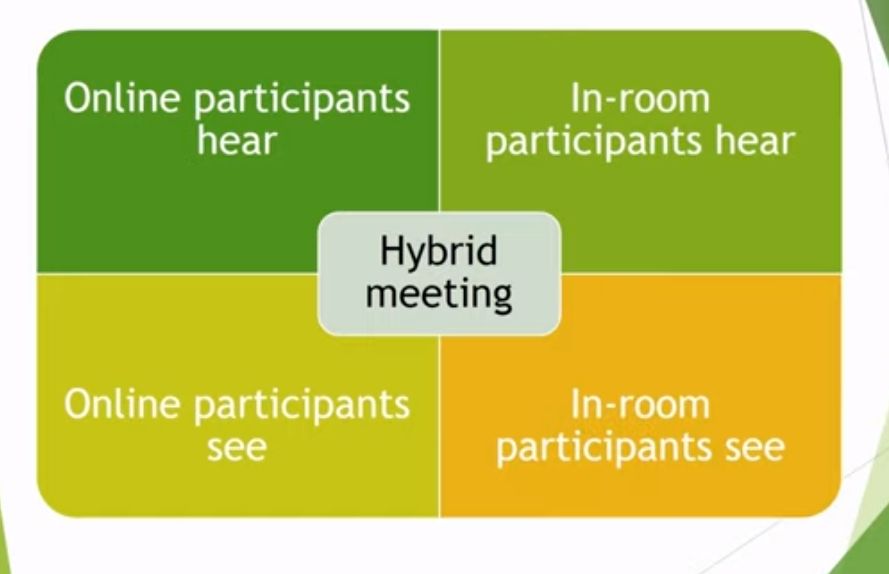
Goal of a Hybrid Meeting
The goal of a Hybrid meeting is for Virtual and In person attendance to be of equal value, and be as close as they can be of a learning experience. For simplicity, we will look at the factors and qualities of Online vs In Person Participants. However at the end, I want to extend this to five different tiers, each requiring a small amount of extra consideration.
![[Pasted image 20220606235137.png]]
Cameras-On vs Cameras-off
If the meeting is collaborative and inpersonal, let people have cameras off. Because of the nature of these trainings, delicate and personal information sharing vulnerability is encouraged, and attendance throughout is mandatory. It is a strictly Cameras-On meeting. The State of NC will require that presence virtually require cameras on for Peer Support Trainings.
Outside of the trainings, be flexible whenever possible. I like tuning into meetings not to be present, but to record and take notes later. This hack can allow someone to 'be in two places at once' and not have that be a detriment.
"Ask yourself, if this meeting could have been a phone call, and if that phone call could have been an email.." Assess whether this meeting has to be camera's on. Having cameras on can be extremely emotionally draining for some people. But it is also the closest thing to in person meeting we can get to virtually.
![[Pasted image 20220606235436.png]]
Online Participants
Online participants need to be able to see and hear in person participants. In person participants need to be able to see and hear online participants. In person and Online participants need to be easily able to work in a break out group. Virtual attendees please ensure your devices are charged and you are somewhere with adequate internet access. We have a digital sign in sheet as well as one in person. You need to sign in every session we meet.
![[Pasted image 20220606235516.png]]
In Person Participants
In person participants are still recommended to bring a mobile or labtop device. Regardless of in person or virtual, there will be note taking and tasks you may want a device present for. We ask that in the duration of the classes, that you be giving undivided focus, and not doing other work, social media activity, or game activities. Self-regulation, body care, and movement are absolutely fine, as long as you are engaged in the course materials. There will be a five minute break after every hour.
![[Pasted image 20220607000852.png]]
Sign In
A simple Google Form can be used as a sign in. The link provided at the start of the meeting. Let sign ins be primarily digital, with a physical signin sheet on site. One of the facilitators can export signin sheet data to the digital spreadsheet. If you have to leave for more than a couple of minutes, please notify a facilitator. If you are not present for part of the class, and do not check in with a facilitator, you may be docked as absent for the entire day. This isn't fun for anyone, but this class has rigid rules about being present.
![[Pasted image 20220606235614.png]]
Sharing Stage
A stage area needs to be present, and two cameras at the site of the workshop. One camera is to show the stage/speaking area. One camera is to show the in person participants. Do not rely on internal device speakers, especially in a room with many people. Get external sound. Feel free to get creative with the speaking area, perhaps decorating it like a Zoom square. If someone in person is speaking, they need to do so in the designated stage space area. Do not have backs turned to cameras, treat cameras like they are a person there.
![[Pasted image 20220606235708.png]]
Chat Box
Sharing and participation can be done via the chat box feature on Zoom, if that is more comfortable. Don't spam the chat, but helpful and noteworthy comments built up are extremely helpful. Every activity has mandatory participation if you wish to complete this training certification. If you are uncomfortable sharing about a particular topic, you can message one of the workshop facilitators. Their name will be highlighted on the list and if a text line.
![[Pasted image 20220606235916.png]]
Shared Google Doc
I remember taking several college classes, where the lectures had a lot of dense information. Come time for exam week, sometimes a good samaritan student would share their class notes as a study tool for other students to use. Sometimes this could be in secret, but other times the professor of the class would be elated for the engaged peer support present in their class, and email the notes as a courtesy and favor for students.
You would be surprised at the works of art that can be created by a Live Word Document shared by two or more individuals. Stories can be written without it interrupting the flow of class. Notes can be collaborated in real time and turned into helpful resources. And best of all, it's really fun and engaging. The finished product can be made available to all participants at the end of the training, and provides a keepsake, if this is done well.
Helpful comments from Zoom chat can be copied onto the shared google document before the meeting closes and those comments are lost for good. Overall this practice allows a different mode of being vulnerable and sharing. I highly recommend it and can provide a demo if that is helpful.
![[Pasted image 20220606235321.png]]
Private Notetaking
Participants are encouraged to bring paper and writing tools to take notes, or keep a notepad open on their device. For individuals who take a lot of digital notes, I want to encourage finding a good Note Manager software such as Notion or Obsidian, which have great completely free versions for all types of operating systems. Obsidian's motto is 'Building the Second Brain' and the software lives up to that hype.
![[Pasted image 20220607000008.png]]
Appropriate Conduct
We're here to support peer trainees, but will not tolerate certain conduct. The first time, we will ask nicely, second time is a firm warning, and third time we have to fail you and it is up to you to appeal and retake the training. If there is something a participant or facilitator do that makes someone uncomfortable, having a conflict mediator present and approachable can be very helpful.
![[Pasted image 20220607000048.png]]
YingYang Meeting Ecology - Both main groups of attendees carry different strengths and weaknesses going into these trainings. Very simplified, but In person participants have the advantage of physical gathering.
Distance Bias- The Virtual Attendees are actually way better to seek comments and feedback through, in order to improve processes of how the training works. Do not write off 'Virtual' as lesser participation, because studies have shown this to be absolutely false. They are 'different' and require different considerations.
Virtual Versus In-Person Focus Groups: Comparison of Costs, Recruitment, and Participant Logistics - PubMed (nih.gov)
Lunch Breaks
If you do a shared lunch break, provide equal access to virtual participants. You may have a budget to get pizza. Up that budget a bit to allow virtual participants to get their own pizza ordered. It sounds dramatic, but before the start of the class, announce that we have a budget to spot lunch for virtual participants. Let virtual participants know that if it is wanted, you can spot 12$ on cashapp, venmo, or paypal to cover their lunch, provided they break bread during the lunch break on Zoom. If it's ahead of time, it gives the virtual participant the option to go to the store, or order delivery, or pick up food, or pocket the money and eat a meal they prepared in their own home.
![[Pasted image 20220601235521.png]]
Five Tiers of User Access
We kept the concept simple this entire time of virtual vs in person participants. But I want to suggest five tiers of user access. It is recommended to get all your personal needs met before class starts. Check in with a facilitator if you need to check out for a few minutes.
Tune in-from-home Participants
These individuals are joining from their home and have all the equipment and space they need to participate. They likely have consistent internet access, a private room, a labtop or desktop computer with microphone and speakers. They may have kids or pets around that may distract. If they have to walk away from the computer to handle something, encourage calling on a phone device to stay tuned. It's important not to punish people for not having the same access capacities, but ensuring everyone going in has a working computer with speakers camera and microphone before is very helpful.
![[Pasted image 20220601235005.png]]
Coffeeshop Participants
I live in a deadzone for my phone plan. No matter what I do, my phone plan doesn't work in my particular neighborhood. If I had to join a conference call, I personally would use my Wifi Landline number. Not everyone is as savvy. If I didn't have that, I would have to drive about two miles to the nearest coffeeshop. These are participants who are self-sufficient, but are traveling to a better location. They may have limitations, such as having to mute their microphone, or be limited in their capacity to share because they are in a public setting. They may not feel as safe sharing a vulnerable story orally on camera, but they may be totally able to write that story out.
![[Pasted image 20220601234727.png]]
Room Squatters
These are virtual participants, that may potentially be joining from within the same building. For whatever reason, maybe one of the facilitators would rather be in their office on the call than in a main room, or one of the participants wants physical solitude, so they travel to a different room in the same building that is not occupied, where they can stretch out, bring their own chair, and not be distracted by background noise. They may come join the in person participants during breaks. A reason for this may be a participant having a Post Traumatic Stress Disorder where they benefit greatly from having control, quiet, and space in their immediate environment. This is not uncommon, lots of executives have their own private offices. Be open to extending that same grace to a workshop participant. I knew a girl who had a visio spatial learning disability, and they would lose things constantly. Everything was a distraction, and they did their best work in a quiet room no one else was in. Facilitators seeing as that some of these spaces are close by is a nice gesture and thought.
![[Pasted image 20220601222811.png]]
In-Room Virtual & In Person Attendees
These are people who are in person attendees, but have their device signed into Zoom, so on the Zoom call, they have the appearance of being a Virtual Attendee. If an in person attendee has the means to do this right, it is very helpful. Keep your microphone muted at all times, because of feedback audio issues. If they need to speak during the meeting, that is what the stage area is for. They can walk over there and present. It may also be helpful for these individuals to bring headphones or ear buds. These will be the attendees you may lean on the most to make sure the in person experience is as close to the virtual experience as possible. As a general rule, if you have the device and equipment to join virtually, join virtually.
![[Pasted image 20220601235248.png]]
In Person Attendees
These are people who show up ready for class. They may not have a labtop, or even a functional cell phone to join virtually. They still need to be seen and heard in the Hybrid meeting. For sharing that is what the stage is for. When they are in the audience background, having a camera facing a chair circle, or semi-circle, with everyone visible allows these participants to be seen virtually. There is a name bar for virtual participants. We can add these manually with physical name markers, or do so digitally, by having a name marker digitally added by each chair.
![[Pasted image 20220601235410.png]]
Virtual Hallway






Comments (0)