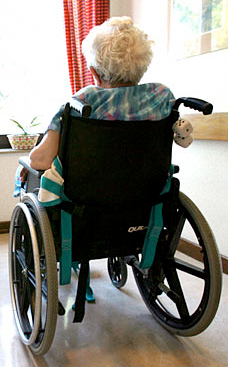
Older people are more likely to have disabilities. Estimates range from about 30% to 60% of older populations, compared to 10%-20% for the population as a whole. Often, we acquire multiple disabilities as a natural part of the aging process. Many of us lose our sight, our hearing, our mobility, and/or our cognition. The combination of multiple disabilities can be challenging for the individuals, which underscores the importance of ensuring accessibility is built into the environment as much as possible.
Countries with large aging populations are likely to have a greater proportion of people with disabilities, all other things being equal. (Factors that could change this expected data trend would be poverty and war, which often cause disabilities in younger populations.)
Looking ahead in this digital age, adults who have spent much of their lives using digital technologies will expect to be able to continue using digital technologies even after acquiring disabilities. The market for accessible digital technologies is expected to increase as more technologically-savvy users age and acquire disabilities.
Data Details for Aging and Disabilities
In countries with life expectancies over 70 years, individuals spend on average about 8 years, or 11.5 per cent of their life span, living with disabilities.
Source: Website: United Nations; Domain:
http://www.un.org/  (original link no longer available)
Disability of Persons 65+ Worldwide
|Age|Percentage with Disability|
|---|---|
|Any Age|10%|
|70+|20%|
|85+|50%|
Source: Website: University at Buffalo - Department of Rehabilitation Science; Domain:
https://publichealth.buffalo.edu/  (original link no longer available)
References: The World Health Organization (2003; 2006)
Disability by Age (New Zealand, 2013)
|Age Range|Percentage with Disability|
|---|---|
|Children under 15 years|11%|
|Adults under 65|21%|
|65 or over|59%|
Source: Website: New Zealand Government; Domain:
https://www.govt.nz  (original link no longer available)
Disability in the United Kingdom 2013: "Only 17% of disabled people were born with their disabilities. The majority of disabled people acquire their disability later in life."
Source:
http://www.papworthtrust.org.uk  (original link no longer available)
References: Website: Institute for Public Policy Research; Domain:
https://www.ippr.org/  (original link no longer available); Article: Work for Disabled People
U.S. Population Aged 65 and Over by Number of Disabilities and Age: 2008−2012
|Age|None|One|Two|Three or More|
|---|---|---|---|---|
|65 and over|61.3%|15.9%|8.0%|14.7%|
|65 to 74|73.6%|13.9%|5.5%|7.0%|
|75 to 84|55.0%|18.7%|9.8%|16.5%|
|85 and over|27.5%|17.1%|13.9%|41.5%|
Source: Website: United States Census Bureau. Domain:
https://www.census.gov/  (original link no longer available)
Notes: U.S. Census Bureau, American Community Survey, 5-year estimates, 2008−2012.
U.S. Population Aged 65 and Over with a Disability by Type of Disability, Age, and Sex: 2008–2012
|Type of Disability|Total|Age 65 to 74|Age 75 to 84|Age 85 and Over|Male|Female|
|---|---|---|---|---|---|---|
|Vision|19.2%|16.5%|18.2%|24.9%|17.6%|20.4%|
|Hearing|40.4%|34.9%|40.6%|48.1%|52.0%|32.3%|
|Cognitive|28.8%|22.6%|28.0%|39.1%|25.9%|30.8%|
|Ambulatory|66.5%|63.6%|65.2%|72.8%|57.1%|73.1%|
|Self-Care|28.4%|20.2%|26.9%|42.4%|23.3%|31.9%|
|Independent Living|47.8%|34.0%|47.2%|68.7%|37.0%|55.4%|
Source: Website: United States Census Bureau. Domain:
https://www.census.gov/  (original link no longer available)
Notes: U.S. Census Bureau, American Community Survey, 5-year estimates, 2008–2012.
In the U.S. Census Bureau 2014 report, Americans aged 85 and older represented 13.6 percent of the total older population (ages 65 and up) and accounted for 25.4 percent of those with a disability.
Source: Website: United States Census Bureau. Domain:
https://www.census.gov/  (original link no longer available)
Reference: He, Wan and Luke J. Larsen, U.S. Census Bureau, American Community Survey Reports, ACS-29, Older Americans With a Disability: 2008 – 2012, U.S. Government Printing Office, Washington, DC, 2014.
Percentage of Persons 65+ with a Disability (United States, 2013)
|Type of Disability|Percentage|
|---|---|
|Independent Living|15%|
|Self-Care|9%|
|Ambulatory|23%|
|Cognitive|9%|
|Vision|7%|
|Hearing|15%|
|Any Disability|36%|
Source: Website: Administration for Community Living; Domain:
https://www.acl.gov/  (original link no longer available)
Notes: U.S. Census Bureau, American Community Survey. Centers for Medicare and Medicaid Services, Medicare Current Beneficiary Survey.
Robust
Defining Robustness
Robustness is about ensuring _compatibility_ with a broad range of user agents, including assistive technologies.
Different user agents (browsers and other web devices) parse web content differently. The differences are apparent across platforms (Windows, Mac, iOS, Android, Linux, etc.), and even across different versions of the same browser. For example, Internet Explorer 8 parses HTML quite differently from Internet Explorer 11, in part because of bug fixes and features added, and in part because of advances in support for newer web specifications, such as HTML 5 and CSS 3. Different versions of screen readers also handle content differently, with newer versions featuring better support for newer technologies such as ARIA. It would be impossible to support all possible combinations of all user agents. There are too many to take into account, and some of them simply aren't robust enough themselves to handle the kinds of things that are necessary for ideal accessibility. You'll have to draw a line in the sand somewhere and say that you'll support Internet Explorer only back to version X, or that you won't support browser Y because its user base is so small and/or because the browser doesn't have a feature set that is rich enough.
Use Standard Markup
One of the best ways to increase the likelihood of robust markup and code across user agents is to use standard markup. To the extent possible, the content should be validated using appropriate validators. You can validate the HTML (see the
W3C HTML validator  ), CSS (see the
W3C CSS validator  ), JavaScript (you can use a tool such as
Firebug  to inspect the code, or an online tool such as
JSLint  ), and other aspects of the markup. Valid markup doesn't guarantee accessibility. And in fact, valid markup is not always necessary for accessibility; it is not a one-to-one relationship between validity and accessibility or robustness. Even so, valid code definitely helps eliminate some of the issues that can lead to problems in different user agents, making your job easier when it comes to narrowing down the causes of potential accessibility problems.
Use ARIA (or other means) to Indicate the Name, Role, and Value of Interactive Components
In the old days of the web, web pages were basically static. They did not have much capability for interaction. These days, most major web sites are highly dynamic, often using custom widgets and scripts to create opportunities for interaction and dynamic display of information. This high level of interactivity demands careful attention to how objects are marked up. Screen reader users need to know that an item is expandable and whether it is currently expanded or collapsed (`aria-expanded="true"` or `aria-expanded="false"`). They need to know if a tab is selected or not (`aria-selected="true"` or `aria-selected="false"`). It's not enough to set these properties once on a page. These properties need to be updated dynamically using JavaScript when their state changes. ARIA ("Accessible Rich Internet Applications") provides a wealth of capabilities for dynamic content that were very difficult or impossible to achieve before. Learn ARIA and apply it.
See Also:
Principle 1Ⅰ: Provide Multiple Means of Representation
We learned that we collect information through the recognition networks in the brain, but collecting that information depends on how that information is presented to us as learners. Learners are diverse. There are learners who may have different cultural backgrounds, learners who may be visually or hearing impaired, and learners who may have cognitive disabilities. Not everyone perceives information the same way, so it is critical that instruction is delivered in various, multiple formats.
!
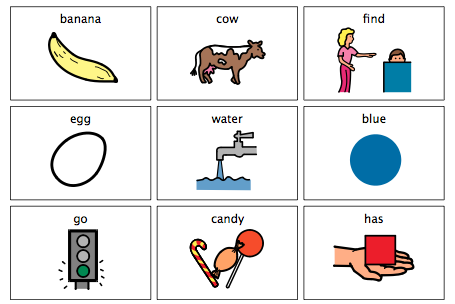
Nine vocabulary words presented in text format and picture symbols. The words are: banana, cow, find, egg, water, blue, go, candy, and has.
Principle 1Ⅰ: Multiple Means of Representation focuses on ensuring variety in instructional delivery. Different mediums should be considered when teaching learners. Presenting information in formats such as print, electronic text, visual and aural is critical. Consider those who may have cognitive, visual, and auditory disabilities, or those who may speak a different native language. For a student who has a cognitive disability, providing instructional visuals may help him or her process information; but a visual will not assist a student who is visually impaired. Implementing multiple instructional options will enhance the chances of diverse learners achieving learning goals and objectives.
Guidelines for Multiple Means of Representation
- Guideline 1
- Guideline 2
- Guideline 3
Guideline 1: Provide Options for Perception
Information is perceived through the senses, particularly through sight, sound, and touch. If instructional information is not presented in a way a learner perceives information, it will be extremely difficult for the learner to grasp the knowledge. Preventing imperceptibility involves presenting the same kind of information in different formats, particularly in formats students can customize based on their specific needs. When options for learners are built into instructional materials, it maximizes a teacher's chances of reaching a greater number of students.
Checkpoints for Guideline 1
|Checkpoint|Recommendations|
|---|---|
|Checkpoint 1.1: Allow Information to be Customized|Teachers should consider presenting information in print as well as in digital formats. When digital materials are presented, students should be able to customize the information according to their specific needs. For example, learners should be able to adjust text and image sizes, change fonts, color contrast, the sound and speed levels of audio and video resources.|
|Checkpoint 1.2: Make Auditory Information Accessible|Be aware that information presented audibly may not be accessible to students who are deaf or hard of hearing. Consider providing captions and transcripts for video and audio, incorporate speech-to-text technology in the classroom, and supply visual interpretations of music or sounds.|
|Checkpoint 1.3: Make Visual Information Accessible|Be cognizant that information presented in a visual format may not be accessible to students who may be blind or visually impaired, or to students who may not know how to interpret graphics due to their backgrounds. Provide both print and electronic descriptions of images and graphics, and use physical, tactile models (maps, atomic structures) for students to touch to grasp information.|
Guideline 2: Provide Options for Language, Mathematical Expressions, and Symbols
Different representations of content should be presented to learners to not only increase accessibility, but to enhance comprehension. There are instances where learners may not know or understand what a graphic or symbol may be communicating to them, or what a mathematical equation may be asking of them. This could be due to a specific disability or it could be due to differing cultural backgrounds. In any case, instructors should provide supplemental materials that increase understandability.
Checkpoints for Guideline 2
|Checkpoint|Recommendations|
|---|---|
|Checkpoint 2.1: Explain Vocabulary and Symbols|It is vital to the learning process that instructors take time to teach vocabulary and symbol meanings that will enable students to be successful. Provide descriptions along with graphics and symbols; and supply additional resources like definitions and translations for unfamiliar terms.|
|Checkpoint 2.2: Highlight Syntax and Structure|The structure of sentences or math equations may be confusing or unfamiliar to some learners. Ensure that relationships between structures are highlighted and emphasized. Additionally, help students connect syntax and structure they have already learned to new knowledge they obtain.|
|Checkpoint 2.3: Help Decipher Mathematical Notation, Text, and Symbols|To help students learn math symbols and notations, and decode them easier, teachers need to use the symbols frequently. Learners can better recall the meaning of symbols, text, and notations if they are used with fluency in the classroom environment.|
|Checkpoint 2.4: Support Other Languages|For learners who are not very familiar with the primary language used in the classroom, additional resources should be provided. Consider supplying definitions and key information in both the primary classroom language as well as a student’s native language. Electronic translation tools may also assist learners in comprehending language. Also, consider complementing text-based materials with visuals to increase understanding of text information.|
|Checkpoint 2.5: Utilize Multiple Media Formats|Text has traditionally been the primary format for instructional materials. However, learning materials presented in text format may be inaccessible to students with cognitive disabilities and print disabilities. Text-based materials should be supplemented with visual illustrations like diagrams, models, charts, and videos. Ensure that connections between the text formats and visual formats are clear to learners.|
Guideline 3: Provide Options for Comprehension
The key to education is to ensure learners are able to use and apply knowledge they consume. Enabling students to link new information to what they have previously learned and incorporating active learning strategies may increase a student’s capacity to process information. Students are diverse in how they process information, so instructors must include variable options for learners to comprehend information.
Checkpoints for Guideline 3
|Checkpoint|Recommendations|
|---|---|
|Checkpoint 3.1: Provide Background Knowledge|Students learn better and retain new information when they can connect the new information to previous knowledge. However, some learners may not have the background information needed to comprehend a new topic. There are also students who may have the necessary background knowledge, but they may not know how to associate it with new knowledge. Instructors need to make sure that background knowledge is supplied and activated to make learning more meaningful. Teach prerequisites and use aids like concept maps to assist students in joining new information with prior knowledge.|
|Checkpoint 3.2: Focus on Patterns, Critical Features, Big Ideas and Relationships|One critical key to learning is the ability to determine what is important to know from what is secondary, or not so important to know. Being able to focus on critical information makes learning more efficient. However, some students may need assistance in determining what they really need to learn. Highlighting major concepts and elements in instructional materials and delivery can help students select primary information from secondary information. Instructors can use resources like outlines, examples, and cues to help learners identify essential information.|
|Checkpoint 3.3: Support Information Processing, Visualization, and Manipulation|The ability to use new information is based on that information being successfully processed. Processing information is a skill that needs to be nurtured during the learning process. The skill involves learners being capable of picking, choosing, and modifying information in a manner that allows them to better recall and remember that information. Instructors can foster these skills in students through progressive guidance. Some examples include using scaffolds in learning materials and activities, sequentially guiding students through step-by-step procedures, and delivering instructional content in smaller, digestible parts.|
|Checkpoint 3.4: Support Transfer and Generalization|Once learners process information, they need to be able to apply that information to different situations. This ability also needs to be cultivated during the learning process. Using multiple means of representation is vital in supporting students being able to use information in different contexts. Instructors should use various teaching methods that trigger students to connect and transfer what they have previously learned to new information. Instructors should encourage students to use studying techniques like mnemonic devices for memory and generalization, and provide different ways for students to gather information like concept maps and outlines for taking notes.|
Perceivable: More than one sense
Operable: Variety of input methods
Understandable: logical and predictable
Robust: compatible across platforms and assistive technologies
Principles of Universal Design
1) equitable use: for people all different abilities
2) flexibility in use: configurable to accomodate needs
3) simple intuitive: easy to understand for everybody
4) perceptible information: communicates all necessary information for everybody
5) Tolerance for error: minimizes hazards, accidents, unintended actions
6) Low physical effort: can be used efficiently, comfortably, with minimal fatigue
7) size and space for approach and use: shouldn't restrict anyone by size or space






Comments (0)